
- /
- /
- /
Credits/Debits to the Family
- Admin can Add Credits or Subtract Debits to the Family from the family profile page.
- Naviagte to the Familes Menu from the side bar and Click on the family name to open their profile, or search the family name from the top search bar. Family profile page will be displayed as shown in the screenshot below.

- Click on the Update Credits button and it will open a popup as shown in the screenshot below.

Step 1 : Select the Transaction type either Credit or Debit as per the need. Credit will add credits to the family and Debit will subtract the credits from the Famly Credit Balance.
Step 2 : Enter the Amount to be Credited or Debited.
Step 3 : Enter the Description based on the Reason/Purpose(for the reference) we add credits or subract debits from the Family Credit Balance.
Step 4 : Select the checkbox to send and Email notification to the Family.
Step 4 : Select the checkbox to send and Email notification to the Admin. - Click Submit button will credit/debit the amount to the family wallet.
- Click
 button to see the total history of the credit for the family and for which order the credit amount has been used to.
 - In the Family Info section the Credit Balance is shown like below.

- Family can use this credit for the payment of the class or booking of the party. Wallet amount can be used in the payment page for enrolling class and booking the party. An example screenshot is attached in the screenshot below.
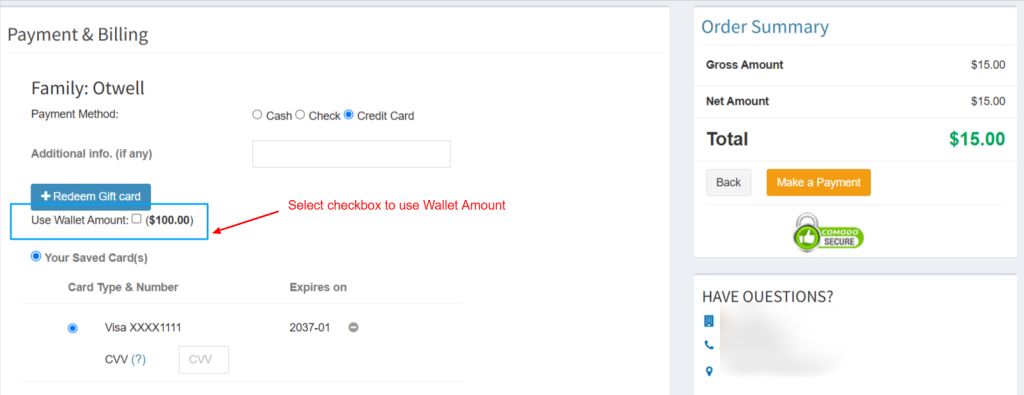
- Select the check box Use wallet amount to use the amount for the class enrollment and the balance amount for the class/party will be deducted from the credit card.